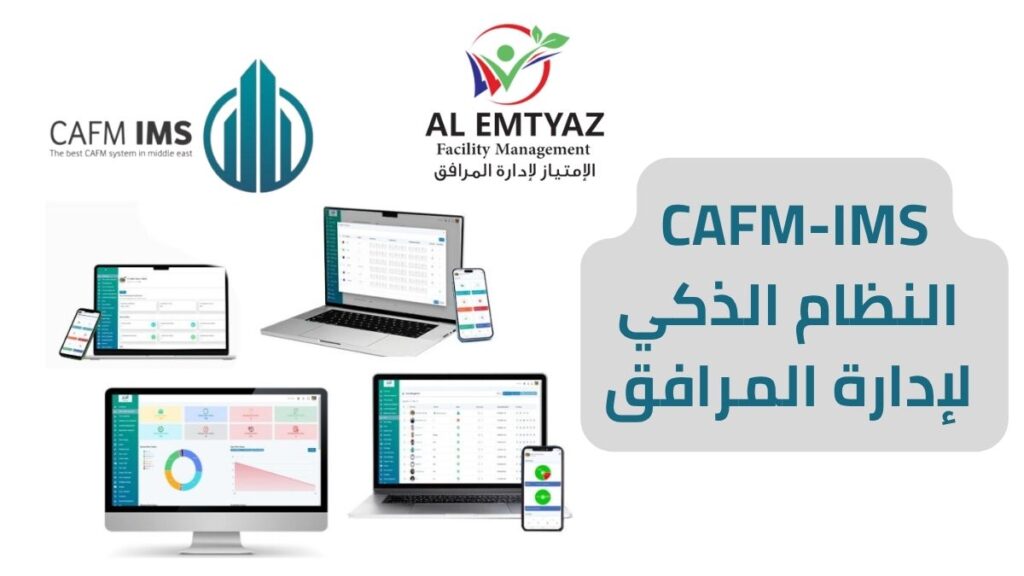
Managing facility assets, maintenance requests, and technical teams across multiple locations can be challenging without a centralized system. The Asset and Facility Management System (CAFM Software) from AL Emtyaz Facilities Management brings asset tracking, preventive maintenance, work orders, inventory, and operational reporting into one digital platform.
Our facility asset management software helps organizations monitor equipment conditions, organize maintenance schedules, assign tasks to technicians, and maintain accurate records of their buildings and infrastructure. Instead of relying on spreadsheets, paperwork, and disconnected messages, your team can manage daily operations through a centralized dashboard.
Whether you manage a hospital, university, hotel, factory, commercial building, or a portfolio of properties, the system provides the tools needed to improve maintenance coordination, increase asset visibility, and support better operational decisions.
With web-based access, mobile applications, and support for Arabic and English, the CAFM system makes information accessible to facility managers, maintenance supervisors, and field technicians.
Request a free CAFM software demo in Jordan. Contact AL Emtyaz at 00962792240053 to explore how our asset and facility management solution can support your organization.
You can also contact our team directly through WhatsApp:
What Is an Asset and Facility Management System?
An Asset and Facility Management System is a digital platform designed to organize, track, and manage physical assets, buildings, equipment, maintenance activities, and facility operations.
It provides a centralized database where facility managers can access information about every registered asset, including its location, condition, maintenance history, and associated work orders.
When incorporated into Computer-Aided Facility Management (CAFM) software, these capabilities connect asset information with maintenance planning, service requests, technical teams, spare parts, and operational reports.
For example, a facility manager can identify a specific air conditioning unit, review previous repairs, schedule the next preventive maintenance visit, and monitor the technician responsible for the task through the same system.
The system supports a wide range of organizations, including:
- Manufacturing facilities: Track production equipment, machinery, maintenance schedules, and critical infrastructure.
- Hospitals and healthcare facilities: Organize maintenance records for medical equipment, electrical systems, HVAC equipment, and essential building services.
- Universities and schools: Manage educational buildings, classrooms, laboratories, equipment, and maintenance requests.
- Hotels and hospitality facilities: Coordinate maintenance across guest rooms, public spaces, technical systems, and operational areas.
- Government facilities: Maintain centralized asset records and monitor maintenance performance across departments and locations.
- Commercial properties: Manage building equipment, service requests, preventive maintenance, and technical operations across multiple sites.
By combining these functions, facility asset management software helps organizations move from fragmented maintenance records to a more structured and transparent approach to facility operations.
Key Features of Our Asset and Facility Management Software
The CAFM system from AL Emtyaz combines asset management, maintenance coordination, mobile access, and performance reporting in one platform. Its features are designed to simplify daily workflows and provide better visibility into facility operations.
1. Web-Based and Mobile Facility Management
Access facility information through a web browser or mobile application. Managers can review maintenance requests, monitor asset records, and follow up on assigned work without depending on paper files or a single office computer.
2. Arabic and English Language Support
The software supports both Arabic and English, making it practical for multilingual facility management teams. Administrators, supervisors, and technicians can work with an interface that suits their operational environment.
3. User-Friendly Facility Management Dashboard
A centralized dashboard organizes maintenance requests, asset information, task progress, and operational indicators. This helps managers locate important information quickly and reduces the need to switch between separate systems.
4. QR Code Asset Tracking and Equipment Records
The asset tracking system allows equipment and facility assets to be linked with individual QR codes. Scanning an asset’s code provides quick access to its registered details, location, maintenance history, and related service information.
This is particularly useful for organizations managing hundreds or thousands of assets across different departments, floors, or buildings.
5. Multi-Site Asset and Facility Management
Organizations with multiple buildings, branches, or facilities can structure their operations under one platform. Assets and maintenance tasks can be organized by location, allowing centralized supervision while maintaining visibility into individual sites.
The system is designed to accommodate organizations with extensive user and location requirements. Configuration and deployment details can be reviewed during implementation planning.
6. Mobile Maintenance Application for Technicians
Field technicians can receive assigned work orders, update task status, upload maintenance photographs, and record completed activities through a mobile application. Location information can also be documented when required by the workflow.
This improves communication between maintenance supervisors and field teams and helps keep job records up to date.
7. Maintenance Reports, KPIs, and SLA Tracking
Facility managers can monitor operational performance through reports and key performance indicators (KPIs), including maintenance completion, open work orders, technician activity, and service response times.
Service Level Agreement (SLA) tracking helps supervisors compare actual performance against agreed response and completion targets.
8. Paperless Maintenance Management
Maintenance requests, supporting documents, photographs, service records, and operational reports can be stored digitally. This reduces dependence on printed forms and makes maintenance information easier to retrieve and review.
9. Cloud-Based Facility Management for Large Organizations
The cloud-based system supports centralized facility management across geographically separated locations. Its multi-site structure helps organizations coordinate maintenance activities, access operational records, and review performance from a common management environment.
These capabilities make the system suitable for organizations seeking improved asset visibility, structured maintenance workflows, and more consistent reporting.
Discover how the system works for your facilities. Request a free demonstration from AL Emtyaz and discuss the features most relevant to your operations.
How a CAFM System Solves Common Maintenance and Facility Management Challenges
Facility management teams often face challenges such as unexpected equipment failures, missing maintenance records, delayed work orders, and limited visibility into spare parts inventory.
An integrated asset and maintenance management system addresses these problems by connecting service requests, equipment records, technicians, and reporting through structured digital workflows.
- Unexpected equipment breakdowns: Maintenance requests can be recorded against specific assets, with work orders created and assigned according to configured procedures. Historical equipment records also help technicians understand recurring problems.
- Poor spare parts inventory control: The inventory management module records available quantities, parts issued for maintenance, consumption history, and replenishment requirements, supporting more accurate stock monitoring.
- Lost or delayed maintenance tasks: Every registered work order has a documented status, assigned responsibility, and activity history. Supervisors can identify pending tasks and follow their progress through completion.
- Disconnected operational information: Centralized records reduce the need to search across emails, spreadsheets, and separate maintenance files. Integration with enterprise and reporting tools such as SAP, Microsoft Power BI, or Tableau can be assessed according to technical requirements and available interfaces.
- Limited maintenance supervision: Dashboards and reports allow managers to review outstanding requests, completion rates, maintenance activity, equipment history, and SLA indicators from a central location.
By connecting these activities, CAFM software creates a more organized workflow from the initial maintenance request to task completion and performance reporting.
Core Modules of the Asset and Facility Management System
The asset and facility management platform from AL Emtyaz includes interconnected modules covering equipment records, maintenance planning, technical operations, spare parts, helpdesk requests, and reporting.
Each module supports a specific operational function while contributing to a unified view of facility performance.
- Facility Management Dashboard: Provides an overview of open maintenance requests, active work orders, task progress, and key operational indicators in a centralized interface.
- Asset and Location Management: Maintains equipment records, asset classifications, building locations, maintenance histories, and QR code identification.
- Planned Preventive Maintenance (PPM): Supports scheduled inspections and recurring maintenance activities based on equipment requirements, service intervals, and operational plans.
- Work Order Management: Organizes corrective and preventive maintenance tasks, technician assignments, work status updates, and completion documentation. Configured workflows can also support automatic work order generation.
- Incident and Maintenance Reporting: Records operational incidents, photographs, observations, timestamps, and associated maintenance actions for future review and analysis.
- Spare Parts and Inventory Management: Tracks stock quantities, parts usage, inventory movements, and supply requests associated with maintenance operations.
- Helpdesk and Service Request Management: Allows authorized employees, departments, or facility users to submit maintenance requests and follow their progress from registration to closure.
- Technician and Team Management: Supports technical team organization, task distribution, user roles, and access permissions according to operational responsibilities.
- SLA Management and Task Prioritization: Helps define response targets, assign maintenance priorities, monitor progress, and evaluate service performance against agreed requirements.
Working together, these modules create a connected facility maintenance management system that improves the flow of information between helpdesk teams, technicians, supervisors, and facility managers.
Types of Assets and Facilities Managed by the Software
An effective facility asset management system must support different categories of equipment, infrastructure, and physical spaces. The platform allows organizations to register and organize a wide variety of assets according to their technical characteristics and maintenance requirements.
From individual equipment items to entire buildings, assets can be associated with locations, maintenance activities, service histories, and responsible teams.
- HVAC and Air Conditioning Systems: Manage chillers, air handling units, ventilation equipment, exhaust systems, air curtains, and associated components. Track maintenance schedules, service records, and equipment conditions.
- Electrical Systems and Generators: Register electrical panels, transformers, uninterruptible power supplies (UPS), backup generators, and lighting systems. Maintain inspection schedules and repair histories.
- Plumbing and Water Systems: Organize records for water pumps, storage tanks, pipe networks, hot water equipment, and related infrastructure. Monitor maintenance requests and technical service activities.
- Elevators and Escalators: Track equipment details, maintenance contracts, inspection records, breakdown reports, service visits, and repair documentation.
- Fire Protection and Alarm Systems: Maintain records for fire extinguishers, sprinkler systems, fire pumps, alarm panels, and related safety equipment, including inspection and maintenance schedules.
- Building Automation and Security Systems: Organize assets associated with Building Management Systems (BMS), CCTV, access control, intercom systems, and public address equipment.
- Office Furniture and Equipment: Record desks, chairs, storage units, office equipment, asset locations, conditions, and relevant repair or replacement requests.
- Medical Equipment: Support the documentation of healthcare equipment such as patient monitors, anesthesia equipment, and medical imaging systems, including equipment information and maintenance records.
- IT Infrastructure and Network Equipment: Track servers, routers, network components, telecommunications equipment, and related technical maintenance requests.
- Buildings, Rooms, and External Areas: Structure facilities by site, building, floor, room, or external location. Link registered equipment and maintenance tasks to the relevant physical spaces.
This structured approach to asset tracking and facility management helps organizations understand where their assets are located, how they are maintained, and which activities are required to keep facilities operational.
CAFM Software Implementation, Training, and Technical Support
Implementing an asset and facility management system involves more than installing software. Organizations need accurate asset information, well-defined maintenance procedures, trained users, and reliable support.
AL Emtyaz Facilities Management supports organizations throughout the implementation process, from initial requirements assessment and asset registration to user training and operational deployment.
1. Facility Assessment and Asset Data Setup
The implementation process begins with understanding the organization’s facilities, operational requirements, asset categories, and existing maintenance procedures.
Asset information is then organized and classified by location, equipment type, and relevant maintenance requirements. This provides the data foundation for work orders, inspections, preventive maintenance schedules, and reporting.
2. Practical Training for Managers and Technicians
Training sessions help facility managers, maintenance supervisors, technicians, and system users understand their daily workflows. Practical examples can be based on the organization’s actual assets, maintenance requests, and operational procedures.
The objective is to help each user perform assigned tasks confidently and maintain accurate information within the system.
3. Mobile Application Setup for Field Technicians
Field technicians can use the mobile maintenance application to review assigned jobs, update task progress, upload photographs, and document completed work.
This supports faster information sharing between field teams and supervisors while reducing dependence on handwritten maintenance records.
4. Ongoing Technical Support
AL Emtyaz provides technical assistance to support system users, address operational questions, and help organizations maintain effective digital workflows.
Support arrangements and service requirements can be discussed according to the organization’s operational needs.
5. Flexible System Deployment
The implementation plan can be adapted to the number of facilities, registered assets, users, and required modules. Organizations with prepared asset data and straightforward requirements may be able to begin using the system within a short deployment period.
The final implementation timeline depends on configuration, data preparation, training needs, and the complexity of the facility management environment.
Start with a free system demonstration. Our team can discuss your asset management requirements and explain the steps involved in implementing CAFM software for your facilities.
Facility Management Standards, Documentation, and Operational Control
Organizations evaluating facility management software should consider more than daily maintenance functions. Documented workflows, operational controls, information security, and performance monitoring also play an important role in long-term facility management.
A structured CAFM platform can help teams maintain the records, maintenance histories, and reports needed to support internal management procedures and applicable compliance requirements.
Centralized Maintenance Documentation
Digital asset registers, inspection histories, incident reports, and completed work orders provide a documented record of maintenance activity. This makes information easier to review during management assessments, inspections, and operational audits.
ISO Standards Relevant to Facility Management
Organizations may evaluate their facility management procedures in relation to internationally recognized management standards, including:
- ISO 9001 – Quality Management: Provides a framework for managing processes, monitoring performance, and supporting continual improvement.
- ISO 41001 – Facility Management: Establishes requirements for a facility management system focused on effective service delivery and organizational needs.
- ISO 22301 – Business Continuity Management: Addresses organizational preparedness and the continuity of critical activities during disruptions.
- ISO/IEC 27001 – Information Security Management: Defines requirements for managing information security risks through an information security management system.
CAFM software can support documentation and monitoring activities relevant to these management frameworks. However, using software does not automatically establish organizational compliance or certification. Any specific certifications should be verified through the applicable certificates and their scope.
Operational Reporting and Facility Management Best Practices
Structured maintenance records, documented responsibilities, scheduled inspections, and performance reporting support better facility management practices.
The ability to review asset histories, maintenance completion rates, and service performance helps organizations identify recurring issues and plan operational improvements.
When evaluating a CAFM solution, organizations should also review deployment requirements, user permissions, data management procedures, integration needs, and technical support arrangements.
Frequently Asked Questions About Asset and Facility Management Systems
What is the difference between CAFM software and CMMS software?
CAFM (Computer-Aided Facility Management) software supports broader facility operations, including assets, buildings, locations, service requests, and maintenance activities. A CMMS (Computerized Maintenance Management System) focuses primarily on equipment maintenance, work orders, preventive maintenance, and maintenance records. The two systems often share several functions.
Can the system manage assets across multiple buildings or locations?
Yes. The system supports multi-site facility management, allowing organizations to organize assets, maintenance records, and operational tasks by building, department, or location while maintaining centralized supervision.
Does the software support preventive maintenance scheduling?
Yes. The Planned Preventive Maintenance (PPM) module helps organizations schedule recurring inspections and maintenance tasks according to asset requirements and predefined maintenance intervals.
Can technicians manage work orders through a mobile application?
Yes. Authorized technicians can receive assigned work orders, update their progress, upload maintenance photographs, and record completed tasks using the mobile application.
What types of assets can be tracked with the system?
The system can organize a wide range of physical assets, including HVAC equipment, electrical systems, generators, pumps, elevators, fire safety equipment, medical equipment, office assets, and IT infrastructure.
Is the asset and facility management software available in Jordan?
Yes. Organizations in Jordan can contact AL Emtyaz Facilities Management to discuss their operational requirements, request a software demonstration, and learn about implementation and support options.
Can I request a free demonstration before choosing the system?
Yes. Contact our team to request a free demonstration and explore the software’s asset management, maintenance scheduling, work order tracking, and reporting capabilities.
Get an Asset and Facility Management System for Your Organization
Managing facility assets and maintenance operations through disconnected spreadsheets and manual processes can make it difficult to maintain accurate records, coordinate technicians, and monitor performance.
The Asset and Facility Management System from AL Emtyaz brings asset registration, preventive maintenance scheduling, work orders, technical teams, inventory management, and operational reporting into one digital environment.
Whether your organization manages one building or multiple facilities, our CAFM software can help establish more organized maintenance workflows and provide better visibility into equipment and facility operations.
Explore a practical solution for tracking physical assets, coordinating maintenance requests, monitoring service performance, and supporting facility management decisions.
Request your free CAFM software demo today. Call AL Emtyaz Facilities Management at 00962792240053 to discuss your requirements and learn how our asset and facility management system can support your organization in Jordan.
You can also reach our team through WhatsApp using the button below: