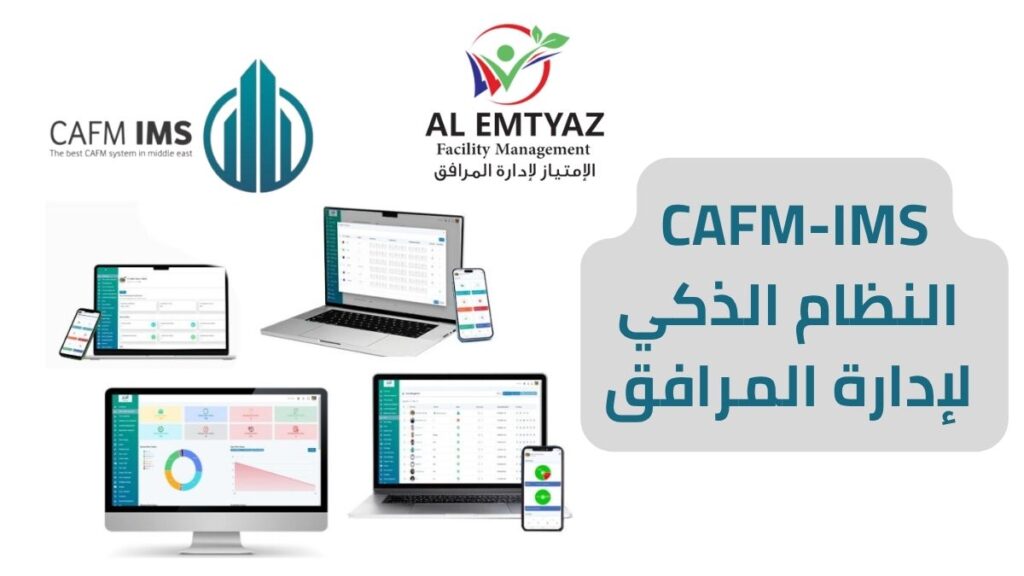
CAFM software from AL Emtyaz Facilities Management helps organizations manage buildings, maintenance operations, assets, and technical teams through one centralized digital platform. Instead of relying on spreadsheets, paper forms, or disconnected communication channels, facility managers can monitor daily operations and make better decisions using accurate, up-to-date information.
Whether you manage a hospital, hotel, commercial building, factory, bank, educational institution, or government facility, our Computer-Aided Facility Management (CAFM) system gives you the tools to organize maintenance activities, track equipment, manage work orders, and improve operational efficiency.
From preventive maintenance scheduling and asset tracking to spare parts inventory, technician assignments, and performance reporting, our facility management software brings essential operations together in one easy-to-use system accessible through a web browser and mobile application.
Spend less time searching for information, coordinating maintenance requests, and preparing manual reports. Give your team a clearer way to manage facilities, respond to problems, and maintain important building assets.
Want to see how our CAFM system works? Contact AL Emtyaz to request a free demonstration and explore how the software can support your facility management requirements.
Call 00962792240053 to arrange your free CAFM software demo and discuss the features your organization needs.
Our team can help you understand the system, configure the relevant modules, and guide your employees through the implementation and training process.
You can also contact us directly through WhatsApp:
What Is CAFM Software and How Does It Work?
CAFM stands for Computer-Aided Facility Management. It refers to software designed to help organizations plan, manage, monitor, and improve the operation and maintenance of buildings and facilities.
A CAFM system connects information about buildings, equipment, assets, maintenance schedules, service requests, technical teams, and operational costs. Facility managers can access this information through a centralized platform instead of managing separate records across different departments.
With CAFM software from AL Emtyaz, managers can create maintenance tasks, assign technicians, monitor progress, access asset histories, and review operational reports. Technical employees can receive assignments and update work orders through a mobile application while working on-site.
What Can a CAFM System Help You Manage?
- Facility assets: Register equipment, track locations, and maintain detailed asset records.
- Maintenance operations: Schedule preventive maintenance and manage corrective maintenance requests.
- Work orders: Assign tasks, update their status, and document completed maintenance activities.
- Technical teams: Organize employee responsibilities, workloads, and daily assignments.
- Spare parts: Monitor inventory levels, stock movements, and material consumption.
- Facility performance: Review maintenance costs, operational indicators, and management reports.
Whether your organization operates a single building or manages multiple facilities, computer-aided facility management software provides a structured digital approach to coordinating maintenance, assets, and daily facility operations.
Key Benefits of CAFM Facility Management Software
Choosing the right CAFM facility management system can improve how your organization monitors maintenance activities, coordinates employees, and manages operational resources.
AL Emtyaz CAFM software combines practical facility management tools with digital reporting and automated workflows to help organizations work more efficiently.
1. Paperless Facility Management
Traditional facility management often involves printed maintenance requests, handwritten records, physical files, and spreadsheets. These methods can make information difficult to locate and increase the possibility of missed tasks or incomplete documentation.
Our digital facility management software allows teams to manage work orders, service requests, maintenance histories, inventory records, and operational reports electronically.
- Create and update maintenance requests digitally.
- Store equipment records and supporting documents.
- Record task completion, photos, notes, and electronic signatures.
- Search maintenance histories without reviewing physical files.
- Access facility information from authorized user accounts.
This approach improves documentation, reduces repetitive administration, and gives managers faster access to information needed for daily decisions.
2. Web-Based CAFM Software and Mobile Access
Facility management teams need access to information both inside the office and at maintenance locations.
The AL Emtyaz CAFM system supports operations through a web-based interface and a mobile application, allowing managers and technical teams to remain connected while performing their responsibilities.
- Web access: View assets, maintenance schedules, service requests, dashboards, and operational reports through a browser.
- Mobile work orders: Receive assignments and update maintenance task status from the field.
- Photo documentation: Attach images and observations to maintenance records.
- Electronic signatures: Record task acknowledgment and completion where required.
- Centralized updates: Keep maintenance information available to authorized users across the organization.
This helps reduce communication delays between supervisors, maintenance teams, and facility managers.
3. Arabic and English Language Support
Organizations in Jordan and across the region often employ teams that communicate in different languages.
AL Emtyaz CAFM software supports Arabic and English, helping organizations provide a more accessible working environment for managers, supervisors, and maintenance technicians.
Language support extends across system interfaces and relevant operational functions, including reporting, forms, notifications, and mobile workflows.
4. Easy-to-Use Facility Management Interface
A successful CAFM implementation depends on employees being able to use the software during their daily work.
Our facility management system is designed with straightforward navigation, organized modules, clear task statuses, and accessible operational information.
- Organized dashboards for daily facility management activities.
- Clear work order status indicators and task priorities.
- Accessible equipment and maintenance records.
- Structured workflows for managers and technical employees.
- User training and guidance during system implementation.
By making the software easier to understand and operate, organizations can encourage employees to use it consistently across different departments.
5. Real-Time Facility Management Reporting
Reliable reporting helps facility managers understand what is happening across their buildings and maintenance operations.
With CAFM reporting and analytics, managers can monitor maintenance performance, track recurring problems, and evaluate how effectively teams complete assigned work.
- Monitor open, pending, and completed work orders.
- Compare preventive maintenance against reactive maintenance activities.
- Identify equipment with frequent breakdowns.
- Review maintenance costs by asset, site, or department.
- Generate daily, weekly, and monthly operational reports.
These insights can support maintenance planning, resource allocation, budget preparation, and continuous operational improvement.
6. Reduce Maintenance Costs and Improve Efficiency
Unexpected equipment failures, inefficient task assignments, and poor inventory control can increase facility operating costs.
A structured facility maintenance management system helps organizations identify opportunities to reduce unnecessary expenses and use available resources more effectively.
- Plan maintenance activities before equipment problems become more serious.
- Reduce time spent coordinating work orders manually.
- Track spare parts consumption and inventory availability.
- Improve technician assignments and workload distribution.
- Monitor maintenance spending and recurring repair costs.
Actual cost savings depend on the organization’s maintenance practices, asset condition, and how effectively the software is implemented.
7. Improve Emergency Maintenance Response
Unexpected failures involving electrical systems, HVAC equipment, water pumps, or other critical building assets require organized maintenance procedures.
The CAFM system helps teams record urgent maintenance requests, classify priorities, notify responsible employees, and track the progress of corrective work.
- Register incidents and equipment failures from the affected location.
- Assign maintenance requests according to urgency and responsibility.
- Send relevant notifications to designated teams.
- Track repair progress and pending actions.
- Maintain records for future review and preventive planning.
These capabilities support faster coordination, better documentation, and more consistent responses to unexpected facility problems.
Core Modules of the AL Emtyaz CAFM System
A comprehensive CAFM software solution should provide more than basic maintenance task tracking. Facility managers also need tools for asset information, inventory, workforce coordination, purchasing, incidents, and performance analysis.
The AL Emtyaz CAFM system brings these operational functions together through dedicated modules that can be organized around the requirements of different facilities.
1. Facility Asset Management
The asset management module creates a centralized register of equipment, building systems, and other assets that require monitoring or maintenance.
Organizations can record HVAC units, electrical equipment, pumps, generators, furniture, technical systems, and other facility assets in one structured database.
Each asset record can include:
- Asset name and identification number.
- Building, floor, room, or equipment location.
- Technical condition and maintenance status.
- QR code identification.
- Maintenance activities and historical records.
- Related work orders and operating costs.
By connecting equipment information with maintenance history, facility managers can identify assets requiring attention and make better repair or replacement decisions.
2. Work Order Management Software
Work orders are a central part of effective facility maintenance. They provide a clear record of what needs to be done, who is responsible, and whether the work has been completed.
The CAFM work order management system allows maintenance requests to be created, assigned, monitored, and documented through a unified workflow.
- Create work orders manually or through configured maintenance schedules.
- Connect tasks to specific buildings, locations, and assets.
- Assign responsible technicians or maintenance teams.
- Send assignments to the mobile application.
- Track statuses such as open, in progress, completed, or awaiting spare parts.
- Attach maintenance photos, technical notes, and completion signatures.
This creates a traceable record of maintenance activities and improves accountability throughout the work order lifecycle.
3. Preventive and Corrective Maintenance Management
Effective maintenance management requires organizations to balance planned equipment servicing with the need to respond to unexpected failures.
Our preventive maintenance software supports both planned and corrective maintenance activities.
- Planned Preventive Maintenance (PPM): Create recurring maintenance schedules for equipment and building systems, with reminders and associated work orders.
- Corrective Maintenance: Register equipment defects, breakdowns, and repair requirements as they arise.
- Reactive Maintenance: Prioritize unexpected problems and coordinate the appropriate technical response.
- Maintenance History: Record completed inspections, repairs, replacements, and recurring issues for individual assets.
By reviewing planned and reactive maintenance records together, organizations can identify recurring failures and improve their future maintenance strategies.
4. Spare Parts and Inventory Management
Maintenance activities depend on having the right materials and spare parts available when required.
The CAFM inventory management module helps facilities track materials, stock movements, and spare parts used during maintenance work.
- Register spare parts and maintenance materials.
- Record incoming and issued stock.
- Associate spare parts with storage locations.
- Set minimum stock levels and replenishment alerts.
- Link spare parts consumption to maintenance work orders.
- Review inventory movements and material usage.
Accurate inventory records can help reduce unnecessary purchases, improve stock visibility, and prevent maintenance delays caused by unavailable materials.
5. Purchasing and Invoice Management
Facility maintenance often involves purchasing spare parts, materials, equipment, and external services.
The purchasing and invoicing module supports the organization of procurement records and maintenance-related financial transactions.
- Register purchase requests and related documents.
- Track purchasing activities from request to delivery.
- Connect invoices to services or assets.
- Monitor invoice approval and payment status.
- Generate reports to support maintenance budget control.
Combining purchasing information with maintenance records gives facility managers greater visibility into operational spending.
6. Incident Management and Facility Reporting
The incident management module allows authorized employees to document unexpected events affecting facility operations.
Incident records can include the affected location, event description, date and time, attached photographs, and the team responsible for corrective action.
Reporting tools can then be used to review:
- Equipment failure frequency.
- Maintenance response times.
- Work order completion rates.
- Maintenance expenses by asset or location.
- Daily, weekly, and monthly operational activities.
Reports can be organized according to operational requirements and exported for management review.
7. QR Code Asset Tracking
QR code asset management simplifies how technicians locate and access equipment information during inspections and maintenance activities.
Each registered asset can be assigned a unique QR code linked to its digital maintenance record.
By scanning the code using a compatible mobile device, authorized employees can:
- Identify the equipment and its registered location.
- Review maintenance history.
- Access relevant technical information.
- Create a maintenance request or work order.
- Document defects, inspection results, or maintenance updates.
This reduces time spent searching for equipment records and helps maintenance staff document activities against the correct asset.
8. User Management and Maintenance Team Coordination
Large facilities may involve maintenance supervisors, electricians, HVAC technicians, mechanical teams, storekeepers, and administrative employees.
The CAFM user management module helps organizations structure access permissions and distribute responsibilities according to job roles.
- Organize technical teams by specialization or facility location.
- Define user roles and access permissions.
- Assign work orders to appropriate employees.
- Review individual and team task completion.
- Track daily maintenance activities.
Clear responsibilities and controlled access support better coordination between departments and maintenance personnel.
9. Data Backup, Geolocation, and Contract Management
Additional operational modules support the management of important facility information beyond everyday maintenance tasks.
- Data Backup: Supports the protection and recovery of stored operational information.
- Geolocation: Helps associate assets and field activities with geographic locations and support location-based coordination.
- Contract Management: Records supplier and service contracts, related assets, contract dates, and renewal reminders.
These capabilities strengthen information organization and help facility managers monitor contractual responsibilities, locations, and important operational records.
Types of Assets You Can Manage with CAFM Software
One of the main advantages of a computer-aided facility management system is the ability to organize different categories of building assets within a centralized database.
Rather than maintaining separate records for electrical systems, HVAC equipment, furniture, outdoor facilities, and other assets, organizations can connect equipment information with maintenance schedules, service requests, costs, and historical records.
1. Buildings, Floors, Rooms, and Facility Spaces
CAFM software allows facility managers to organize information according to a building’s physical structure, including individual floors, rooms, departments, and operational areas.
- Associate assets with specific building locations.
- Monitor maintenance requests by floor, room, or department.
- Identify areas experiencing repeated equipment problems.
- Assign maintenance responsibilities according to location.
- Connect asset information with available location maps.
This location-based organization is especially useful for hospitals, hotels, universities, office buildings, and multi-site facilities.
2. Electrical and Mechanical Systems
Electrical and mechanical infrastructure contains critical components that require regular inspection, maintenance, and performance monitoring.
Examples of assets that can be registered include:
- Electrical transformers and distribution panels.
- Backup power and emergency electrical systems.
- Indoor and outdoor lighting equipment.
- Water pumps and pressure systems.
- Boilers and mechanical plant equipment.
Each asset can be associated with an identification number, maintenance history, operating location, and scheduled inspection activities.
3. HVAC and Air Conditioning Systems
HVAC maintenance management is an important part of facility operations, particularly in hospitals, hotels, commercial buildings, and industrial facilities.
The CAFM system supports maintenance records for heating, ventilation, air conditioning, and cooling equipment such as:
- Chillers and central cooling systems.
- Fan Coil Units (FCUs) and split air conditioning units.
- Cooling pumps and heat exchangers.
- Temperature and humidity control equipment.
- Cold rooms and specialized cooling systems.
- Computer Room Air Conditioning (CRAC) units.
Maintenance managers can connect individual HVAC assets to preventive maintenance schedules, inspection records, and corrective work orders.
4. Fire Safety, Alarm, and Security Equipment
Fire protection and security systems require accurate records and planned inspection activities to support facility safety procedures.
Relevant assets may include:
- Fire pumps and fire protection equipment.
- Fire extinguishers and suppression systems.
- Fire Alarm Systems (FAS).
- Smoke detectors, alarm panels, and sprinkler systems.
- Closed-Circuit Television (CCTV) cameras.
- Access control and intercom systems.
The software can help teams organize inspection schedules, record maintenance activities, and monitor outstanding corrective actions. These records support safety management but do not replace required physical inspections or applicable legal compliance procedures.
5. Furniture and Office Assets
Facility asset management is not limited to mechanical and electrical systems. Organizations can also register furniture and fixed interior assets.
- Office desks, chairs, and storage units.
- Office partitions and meeting room furniture.
- Doors, windows, and interior fittings.
- Other fixed furniture and workplace assets.
Asset records can include location, condition, purchase date, and relevant maintenance information.
6. IT Infrastructure and Network Equipment
Organizations can include selected IT infrastructure assets within their facility asset register for tracking and maintenance coordination.
- Servers and related infrastructure.
- Network switches, routers, and access points.
- Telephone and communication equipment.
- Computers, printers, and supporting devices.
These assets can be associated with technical support activities, assigned locations, and relevant maintenance or replacement records.
7. Outdoor Facilities, Parking, and Landscaping Assets
CAFM software can also manage assets located outside the main building.
- Landscaping equipment and irrigation systems.
- Parking facilities and automatic gates.
- Vehicle barriers and access equipment.
- Outdoor lighting installations.
- External signage and surveillance equipment.
These assets can be included in maintenance plans and tracked through the same facility management platform used for indoor equipment.
8. Solar Panels and Energy Systems
Facilities using solar energy or backup power systems can organize related equipment within the CAFM asset database.
- Solar Photovoltaic (PV) panels.
- Battery storage units.
- Forklift battery charging equipment.
- Smart meters and power generators.
By linking these assets with maintenance schedules, recorded operating information, and related costs, managers can review their long-term maintenance requirements and asset performance.
From HVAC equipment and electrical panels to furniture, solar systems, and outdoor facilities, AL Emtyaz CAFM software helps organizations organize asset information, track maintenance activities, and improve visibility across their buildings.
CAFM Reporting and Analytics for Better Facility Management Decisions
Facility managers need reliable information to evaluate maintenance performance, identify recurring equipment problems, and plan future operational activities.
The reporting and analytics tools in the CAFM system help turn daily maintenance records into useful information for managers, supervisors, and decision-makers.
1. Automated Daily and Periodic Maintenance Reports
Instead of preparing every maintenance report manually, organizations can use configured reporting tools to summarize operational activities.
Scheduled reports can include:
- Open and completed maintenance work orders.
- Locations experiencing recurring breakdowns.
- Daily task completion rates.
- Spare parts and inventory consumption.
- Outstanding maintenance requests.
Reports can be organized according to department, asset category, facility location, or reporting period and configured for email delivery where required.
2. Preventive vs. Reactive Maintenance Analysis
One of the most useful facility maintenance indicators is the relationship between Planned Preventive Maintenance (PPM) and reactive maintenance activities.
CAFM software helps organizations examine how many maintenance tasks are completed according to schedule and how many result from unexpected equipment failures.
- Review preventive maintenance completion rates.
- Identify equipment with repeated reactive work orders.
- Compare planned servicing and corrective maintenance activity.
- Identify assets or locations requiring additional attention.
- Use maintenance records to improve future schedules.
These comparisons support more proactive maintenance planning and help organizations evaluate the effectiveness of their maintenance programs.
3. Facility Management KPIs and Dashboards
Facility Management Key Performance Indicators (KPIs) help organizations measure how well their maintenance teams and operational processes are performing.
The CAFM system supports the monitoring of indicators such as:
- Response Time: How long it takes for the responsible team to respond to a maintenance request.
- Work Order Completion Time: The time required to complete a maintenance task.
- Asset Failure Frequency: How often individual assets experience maintenance problems.
- Technician Productivity: The number and status of tasks handled by technical employees.
- Maintenance Completion Rate: The percentage of planned or assigned activities completed within a reporting period.
Visual dashboards help facility managers review these indicators and identify operational areas that may require improvement.
4. Data-Driven Maintenance Planning
Maintenance records become more valuable when organizations use them to understand recurring problems and plan corrective actions.
For example, a facility manager may need to determine:
- Which equipment requires frequent repairs?
- Which buildings generate the highest number of maintenance requests?
- Which maintenance tasks experience repeated delays?
- Which assets account for significant repair costs?
- Which locations need additional maintenance resources?
By analyzing connected asset, work order, and maintenance data, the CAFM system helps managers answer these questions and make more informed decisions.
Who Needs CAFM Software? Industries and Facilities That Benefit
CAFM software is suitable for organizations responsible for maintaining buildings, managing physical assets, coordinating technicians, and overseeing ongoing facility operations.
Different industries may use the same core facility management modules while configuring maintenance workflows according to their own operational requirements.
1. Facility Management Companies
Professional facility management companies often manage multiple properties, maintenance contracts, technical teams, and client reporting requirements.
A CAFM system for facility management companies can help organize work orders across locations, monitor team performance, track contract-related maintenance activities, and generate reports for property owners or facility operators.
2. Hospitals and Healthcare Facilities
Hospitals and healthcare facilities require structured maintenance procedures for critical infrastructure and technical equipment.
CAFM software can support:
- Scheduled maintenance records for registered medical equipment.
- Maintenance of HVAC, electrical, and mechanical systems.
- Organization of cleaning and facility service requests.
- Tracking of urgent technical maintenance issues.
- Documented inspections and maintenance activities that support compliance processes.
These tools help healthcare facility teams organize maintenance activities and maintain accessible operational records.
3. Hotels and Resorts
Hotels rely on well-maintained guest rooms, reliable building systems, and effective communication between departments.
A hotel facility management system can help maintenance and operations teams:
- Track assets and maintenance requests by room or area.
- Manage maintenance work orders and technical repairs.
- Coordinate tasks between maintenance and housekeeping departments.
- Monitor equipment servicing and outstanding repair requirements.
- Maintain records for important hotel facilities and systems.
Better maintenance coordination helps hotels reduce avoidable operational disruptions and support consistent service standards.
4. Factories and Industrial Facilities
Industrial facilities depend on reliable mechanical systems, electrical equipment, utilities, and supporting infrastructure.
CAFM software supports the organization of:
- Preventive maintenance schedules for registered equipment.
- Daily breakdown and corrective maintenance requests.
- Spare parts and inventory records.
- Technical team assignments and maintenance history.
- Asset-related maintenance costs and performance reports.
By keeping maintenance information centralized, industrial facility managers can improve oversight of their equipment and supporting building systems.
5. Schools, Universities, and Educational Institutions
Educational institutions typically operate classrooms, laboratories, offices, sports facilities, electrical infrastructure, and HVAC systems across several buildings.
CAFM software can help educational facility managers:
- Coordinate maintenance between different buildings.
- Track facility assets and infrastructure condition.
- Organize planned inspections and maintenance schedules.
- Register emergency repairs and technical problems.
- Prepare maintenance reports for administrators.
6. Shopping Malls and Commercial Buildings
Shopping malls and commercial properties involve shared facilities, tenant areas, electrical and mechanical assets, parking systems, and ongoing maintenance requirements.
CAFM software helps manage:
- Maintenance of shared and designated facility areas.
- Work orders by building location or tenant space.
- Service requests and technical assignments.
- Registered equipment and maintenance histories.
- Available records related to utilities and operational costs.
A centralized system makes it easier to coordinate technical operations across large commercial properties.
7. Government Buildings and Public Institutions
Government facilities and public institutions need organized systems for tracking assets, documenting maintenance activities, and managing operational resources.
CAFM software can support:
- Centralized public facility asset records.
- Maintenance schedules and work order documentation.
- Technical team coordination and task monitoring.
- Operational reports for management review.
- Recorded maintenance activities and resource usage.
These functions help public sector organizations improve visibility and consistency in daily facility management activities.
Any organization responsible for buildings, technical assets, and maintenance operations can benefit from a structured CAFM system. AL Emtyaz provides a centralized platform designed to make facility management activities easier to organize, track, and evaluate.
CAFM Software Integration with SAP, Power BI, and Other Business Systems
Many organizations already use separate applications for finance, purchasing, human resources, inventory, and business reporting.
A modern facility management software system should support coordination between these business functions and facility operations.
AL Emtyaz CAFM software offers integration capabilities that can be evaluated according to the existing systems and technical requirements of each organization.
1. SAP Integration for Facility Management
Organizations using SAP for enterprise resource planning may need to connect maintenance and facility data with financial, purchasing, or other business records.
Depending on the configured integration, CAFM and SAP can exchange relevant information involving:
- Maintenance work orders and related records.
- Maintenance expenditure and budget information.
- Purchasing and procurement activities.
- Relevant asset and operational data.
Integration scope depends on the SAP environment, available interfaces, data requirements, and implementation arrangements.
2. Power BI and Business Intelligence Integration
Organizations seeking advanced data visualization may want to connect facility management information with business intelligence tools such as Microsoft Power BI or Tableau.
Where compatible integrations are configured, these tools can help organizations:
- Develop customized management dashboards.
- Analyze maintenance activity across sites and departments.
- Visualize asset performance and operational trends.
- Present facility management KPIs in accessible reports.
This can provide a broader view of facility performance alongside other organizational data.
3. Inventory and Procurement System Integration
Organizations operating separate inventory or procurement applications may benefit from connecting those records with CAFM maintenance activities.
Potential workflows include:
- Exchanging inventory movement information.
- Associating spare parts with maintenance tasks.
- Coordinating purchasing and replenishment activities.
- Reducing duplicate manual data entry between systems.
4. Human Resources and Workforce System Integration
Integrating facility management software with HR systems can help organizations align maintenance team information with employee records and assigned responsibilities.
Depending on system compatibility, relevant workflows may include:
- Importing approved employee records.
- Associating users with roles and departments.
- Managing maintenance team access permissions.
- Reviewing employee task assignments and completion records.
5. API Integration and Scalability
As an organization expands, its facility management requirements may change. Additional buildings, maintenance teams, equipment categories, or reporting requirements may need to be introduced.
AL Emtyaz CAFM software provides API-based integration options to support connections with compatible external systems based on implementation requirements.
Our team can review the technical environment and discuss suitable integration and configuration options for your facility management operations.
CAFM vs. CMMS: What Is the Difference?
When comparing facility management software, organizations often encounter two common terms: CAFM and CMMS. Although these systems share several maintenance functions, they generally address different operational priorities.
What Is a CMMS?
CMMS stands for Computerized Maintenance Management System. A CMMS primarily focuses on equipment maintenance, work order management, preventive maintenance schedules, spare parts, and maintenance records.
How Is CAFM Different?
A CAFM system generally has a broader facility management focus. In addition to maintenance activities, CAFM software can support the management of buildings, spaces, assets, facility services, contracts, and operational information.
The distinction depends on the capabilities of the individual software product, as modern CAFM and CMMS solutions may offer overlapping functions.
Which System Should You Choose?
If your main requirement is maintaining equipment and coordinating technical work orders, a CMMS may be sufficient. If you also need broader oversight of facility assets, buildings, multiple locations, technical teams, contracts, and operational reporting, a CAFM solution may be more suitable.
AL Emtyaz can help you assess your facility management requirements and understand which available CAFM modules are relevant to your organization.
Frequently Asked Questions About CAFM Software
What does CAFM stand for?
CAFM stands for Computer-Aided Facility Management. It is software used to organize and monitor facility operations, including asset records, building maintenance, work orders, technical teams, and related operational information.
What are the main features of CAFM software?
Common CAFM software features include asset management, preventive maintenance scheduling, work order tracking, inventory management, technical team coordination, facility reporting, contract management, and mobile access. Available features vary between providers and software configurations.
Can CAFM software manage multiple buildings?
Yes. CAFM software can support organizations responsible for multiple buildings or facility locations. Managers can organize asset records, maintenance requests, teams, and operational reporting according to the structure of their properties.
Does the AL Emtyaz CAFM system support mobile maintenance teams?
Yes. The system includes mobile access for relevant maintenance workflows, allowing technicians to receive work orders, review assignments, update task status, and document maintenance activities while working on-site.
Can CAFM software help reduce facility maintenance costs?
CAFM software can help organizations identify recurring equipment failures, improve preventive maintenance scheduling, coordinate technical work, and monitor spare parts consumption. These improvements may reduce unnecessary maintenance expenses, although actual savings depend on operational conditions and implementation.
Is CAFM software suitable for hospitals, hotels, and commercial buildings?
Yes. Hospitals, hotels, commercial properties, educational institutions, factories, government facilities, and professional facility management companies can use CAFM software to organize maintenance and asset management activities according to their specific needs.
Does AL Emtyaz offer a free CAFM software demo?
Yes. You can contact AL Emtyaz to request a free CAFM software demonstration, explore the system’s capabilities, and discuss how its modules can be configured for your organization’s facility management requirements.
How can I request a CAFM software demonstration?
Call 00962792240053 or contact AL Emtyaz through WhatsApp. Our team can explain the available system features and discuss your facility management needs.
Get a Free CAFM Software Demo with AL Emtyaz
Looking for a CAFM facility management software solution to manage building assets, maintenance schedules, technical teams, and operational reporting?
Discover how AL Emtyaz Facilities Management can help your organization organize facility operations through a centralized Computer-Aided Facility Management system.
Request a free CAFM system demonstration to explore asset management, preventive maintenance, work order tracking, inventory management, mobile maintenance workflows, and reporting features.
Our team can walk you through the software, answer your questions, and discuss configuration, implementation, and user training based on your organization’s operational requirements.
Call 00962792240053 today to schedule your free CAFM software demo. You can also reach us through WhatsApp using the button below.